
99 Exchange Sign Up — Register Free on the Photon Pop-Up or by Chat
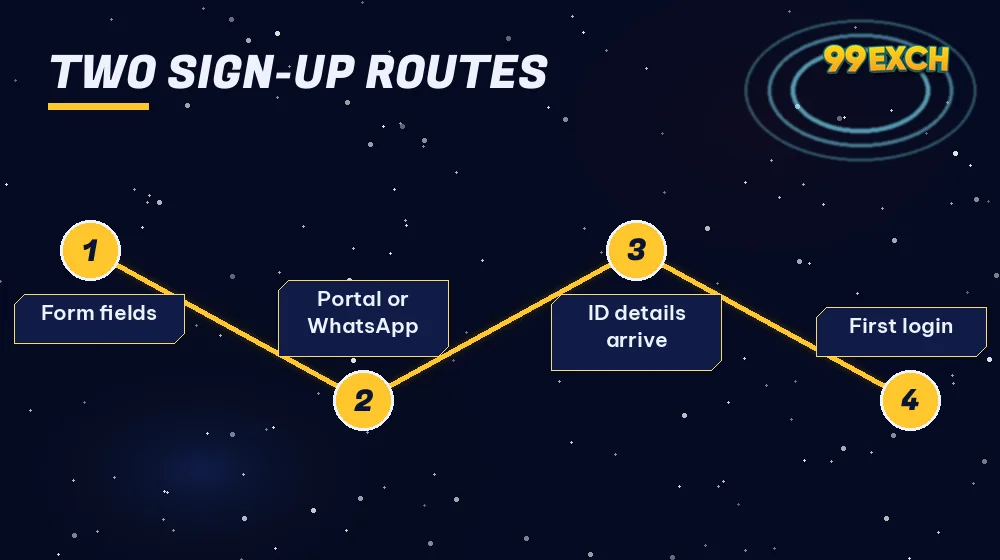
A 99Exch ID is just a user name and a password, and 99 Exchange sign up is how you get that pair: type a name, a +91 mobile, an email and a password into the Sign Up pop-up and carry on to the official portal, or send the 99Exch desk one WhatsApp line and read the pair in its reply. Both cost nothing; so does the demo.

99 Exchange Sign Up Nova Desk — Official ID From One Short Form
Decide two things before you tap through: the user name you will log in with, and the mobile number the 99Exch desk can reach. The rest of the form takes a moment.
99exch Sign Up Form, Field by Field — the Official Order
Inside a 99Exch IDMost people who search for a 99exch sign up want one thing: to know what the form will ask before they open it. Fair enough. Below is the form written out the way the Sign Up pop-up in this site's header shows it, so you can read every box without committing to anything.
One detail first, because it surprises people. Nothing you type into the forms on these pages is kept here; the button simply carries you to the official 99Exch portal at 99exchlogin.com.in, and the details you enter there are the ones that count (so do the real typing on that screen, not this one).
Before you open it. Have your phone unlocked with WhatsApp working, an email inbox you can reach, and a user name already decided. That last one matters most. People who invent a user name on the spot tend to forget whether they used a capital letter, and the 99Exch login will not guess for them; a name you settle on calmly, written down before the form even loads, saves the first awkward exchange with the desk.
No boxes on this route. You write to the 99Exch WhatsApp desk at +91 81097 11726, say you want a new ID, and the user name and password come back as a reply in that chat.
- User name
- This becomes half of your 99Exch login, so pick something short. You will type it on a phone keyboard far more often than you expect, usually in a hurry before a match starts.
- Mobile with +91
- Give the line your WhatsApp runs on. On a dual-SIM phone that is easy to get wrong, and it is the number the 99Exch desk will recognise when you write in later.
- Use an address you check. It is a contact line for your 99Exch account, nothing more exotic than that.
- Password and eye
- On the form route this is the half of the 99Exch ID you set yourself; on the chat route the desk sets it for you. The eye beside the box reveals the string so you can check it.
Read the pop-up again and notice that only the first and last boxes end up as your 99Exch ID; the mobile and the email in between are contact lines. Spend a second on the mobile, though. When you later write to the 99Exch desk about a reset or a withdrawal, that number is how it knows the chat belongs to you, so a SIM you plan to drop soon is a poor pick.
- Open the Sign Up pop-up from the header, or use the form route above, and check that the next screen is the official 99Exch portal.
- Type the user name you chose and keep a note of the exact spelling, capital letters included.
- In the Mobile number box, leave the +91 chip alone and add the digits of your WhatsApp number after it.
- Add an email address you can open on the same phone.
- Set a password, tap the eye to check it, then press the Sign Up button.
- Before closing the screen, copy the user name and password into a private note, then open the 99Exch login and try them once.
Demo first or sign up first? Either order works, and they never touch each other. The 99Exch Demo ID is a practice balance with no payout; your registered 99Exch ID is the one that holds real money. So a demo session tells you whether you like the lobby, and the sign-up form decdes nothing about that, it simply hands you the key to the account you will actually fund.
Small habit, big saving: write the user name and password somewhere private the moment you choose them, because a 99Exch login fails on a single wrong character and the form will not remind you what you picked.
99exch Register on WhatsApp — the Quick Chat Route, Start to Finish
99Exch WhatsApp numberSome players never touch the form. They save the 99Exch desk number, send a message, and let the desk do the 99exch register step on their behalf, which suits anyone who would rather not fight a small keyboard or who got stuck halfway through the pop-up.
The route is short. Probably the shortest on the site.
What you send. Your opening line to +91 81097 11726 only needs the request itself: a new 99Exch ID, please. Add the user name you want if you have one ready. After that the desk leads, so reply in the same thread to whatever it asks.
What comes back. Your 99Exch ID details arrive inside that same WhatsApp chat: the user name and the password you will log in with. That is the whole delivery. No email link, no separate app message, nothing to hunt for elsewhere.
How long does the reply take? Hard to say, and this page will not guess a figure, since the desk does not publish one. What can be said is that the same desk handles password resets and deposit or withdrawal questions later, so the thread you open for the 99exch register request tends to become your main line to 99Exch support.
Check the number itself before sending anything. The 99Exch desk number shown on these pages is +91 81097 11726, written out as text only; there is no click-to-chat link on this site, so you save it by hand. One digit off and your sign-up request goes to a stranger. Compare the saved contact against the digits here, character by character, then write.
A practical point that people skip: save the number as a contact before you write, give it a clear name, and pin the chat once the ID arrives. Scrolling back through family groups to find a password at the toss is not fun. The 99Exch new ID page covers the chat request from the desk side if you want more detail on what gets asked.
Worked example, chat side. Meena has no patience for forms on her old handset. She saves the 99Exch desk number, checks it twice against the digits above, and sends one line asking for a new ID with the user name she would like. The reply in that thread carries her user name and password. She pins the chat, types the details by hand into the 99Exch login, and is in. Total effort: one message and some careful typing.
- Chat went quiet
- Leave the message where it is rather than sending ten more. A single follow-up later in the same thread keeps your 99Exch request in one place.
- Details look odd
- Copy the user name and password from the chat exactly. If a character is unclear, ask the desk to resend it instead of guessing.
- Two IDs by mistake
- Tell the desk in the same chat which 99Exch ID you want to keep before you add funds to either.

First 99Exch Login After You Register — Clear Checks Before Play
99Exch login stepsWhichever door you used, the next screen you need is the 99Exch login. The ID is a user name plus a password, nothing else, and it opens the cricket book, the other sport markets, the live casino tables and the crash games from the same balance.
| Point | 99Exch form route | 99Exch chat route |
|---|---|---|
| What you provide | User name, mobile with +91, email, password | A WhatsApp message asking for a new ID |
| Who picks the password | You do, in the form | It arrives with the ID in the chat |
| Where the details live after | Wherever you noted them down | In the WhatsApp thread with the desk |
| Best for | Players happy to type on the portal | Anyone stuck on the form or short of time |
| Cost to start | Free | Free |
The first login is where a sign up proves itself. Open the Log In form, type the new user name, then the password, and press the button once. A refusal minutes after registering is almost always a typing slip on your side, not a missing account, so compare against your note or the desk chat before asking 99Exch for anything new. After that, the same ID opens in the browser, in the Android app and on any mirror address that loads, with one balance across them.
Which door suits you? A rough rule. If you like choosing your own password and you are on a phone with a decent kyboard, the form is fine. If you are on a slow connection, or the pop-up keeps throwing the same error, the chat is kinder, because the 99Exch desk sets the ID and you only have to read the reply. Plenty of people try the form first, give up on the mobile box, and finish by chat; that is a perfectly normal way to end up with a 99Exch account.
Not ready to fund anything yet? Then don't. The 99Exch demo login gives a practice balance with no deposit and no real payout, and the 99Exch home page shows where it sits in the header forms. For a wider first-week picture (what each lobby holds, where the sports exchange lives) the welcome to 99Exch tour is the better read.
Changed your mind halfway? It happens. Someone starts the 99Exch form, gets as far as the password, loses signal, and then messages the desk instead. If that is you, mention in the chat the user name you tried on the form, so the desk does not set up a second account beside one that may already exist. One ID per person keeps the balance, the history and every later reset in a single place, and that is the whole point of choosing the user name with care at the start.
- Same ID everywhere
- Browser, Android app and every working 99Exch mirror address open the one account.
- Money routes
- Deposits and withdrawals run on Indian rails such as UPI and bank transfer, arranged through the 99Exch desk.
- Help line
- Resets, deposits and withdrawals all go through the same WhatsApp desk that handles registration.
- What these forms keep
- Nothing. Only the official 99Exch portal and the desk ever see the details you register with.
99 Exchange Sign Up Snags — Reliable Fixes for Each Field
Fresh 99Exch new IDRavi, in the example further down, gets stuck three times and each time it is a single box. The tiles follow the 99Exch pop-up from top to btotom, one snag per box.
User name refused on the 99exch sign up — quick fix
Someone already holds that name, or it contains a symbol the form does not like. Add a couple of digits, drop spaces and dots, and try again. Keep it something you can type blind.
Mobile number rejected on 99exch register — clear fix
The code chip already holds +91, so a number pasted from contacts arrives with the code twice. Clear the box and key in the digits on the number pad. Two SIMs? Use the WhatsApp one.
Email not accepted on the 99 Exchange sign up — easy fix
Look for a missing dot before the domain or a space at the end. Autofill on some phones adds a trailing space, and the box reads that as a broken address.
Password trouble at the 99exch sign up — safe fix
Tap the eye and read it. If the form asks for a stronger password, mix letters and digits and lengthen it; then note it down privately before pressing the button.
Worked example. Ravi opens the pop-up at a tea stall, types his name with a space in it, enters his number as 0 followed by ten digits, and the 99Exch form stalls twice. He removes the space, removes the 0, and the user name goes through; the email box then complains about a trailing space his keyboard added. Third try works. Had he not bothered (and plenty of people don't), the WhatsApp desk would have set the ID up for him instead.
If the button does nothing at all, the address you are on may be blocked by your network rather than broken; betting domains in India get blocked by ISPs every so often, and the fix there is a working mirror, not a new account. Already registered once and lost the details? Do not sign up again with the same mobile. Ask the 99Exch desk on the same chat thread, or read the 99Exch ID explainer first so you know which detail to ask for.
The chat route has its own small traps. A password pasted from WhatsApp can pick up a space at either end. Long-pressing to copy sometimes grabs the whole message, greeting and all. And a user name read off a small screen can swap a capital I for a lower-case l without you noticing, which on a 99Exch login is the difference between getting in and getting refused. Type the details by hand the first time, slowly, and compare them with the chat letter by letter.
Still stuck after all of that? Switch doors. The chat route skips every box on this list, which is roughly why so many people end up using it.
Players also search
- 99 exchange sign up
- 99exch sign up
- 99exch register
- 99exch sign up form
- 99 exchange register
- 99exchange sign up
- 99exch new account
- 99exch register on whatsapp
- 99 exch registration
- 99exch account kaise banaye
- 99exch sign up free
- 99exch register online
99exch Register and Sign Up Wording, Matched to the Official Routes
Where the 99 exchange sign up search lands on this page
Typing 99 exchange sign up usually means you want the form itself, so the field list near the top of this page is the answer: user name, mobile with +91, email, and a password with the eye toggle. The submit button hands you to the official 99Exch portal, where the real entry is made.
How the 99exch sign up spelling maps to the same form
- Whether you typed 99exch sign up or the longer 99 Exchange version, the pop-up written out on this page is the same one.
- The joined spelling 99exchange sign up does too; there is no separate account for each spelling.
- One ID then opens the browser site, the Android app and any working mirror.
Why 99exch register often means the WhatsApp desk
People who search 99exch register are often after the chat route rather than the boxes. A message to +91 81097 11726 asking for a new ID gets the user name and password sent back in that thread, which is also where later help with resets and money questions happens.
What the free 99Exch sign up does not include
99 Exchange Sign Up FAQ — Verified Replies for Both Routes
How do I sign up on 99 Exchange?
You sign up on 99 Exchange either through the Sign Up form or through one WhatsApp chat. The form asks for a user name, a mobile number with +91, an email and a password, then sends you to the official 99Exch portal. The chat route needs only a message asking the desk for a new ID.
Is the 99exch register step free?
Yes, getting an ID through 99exch register costs nothing. The pop-up ends at the official portal and the chat ends with a reply from the 99Exch desk, and neither step asks for money. Funding comes later, only if you choose it, through UPI or a bank transfer arranged with the desk, while the Demo ID stays on practice credit.
What details does the 99exch sign up form ask for?
The 99exch sign up form asks for four things: a user name, a mobile number typed after the fixed +91 code, an email address and a password. An eye button beside the password lets you read what you typed. Choose a user name you can retype quickly, since it forms half of every later 99Exch login.
What happens after I send the 99Exch sign up chat?
The 99Exch desk replies in the same WhatsApp thread with your ID details, meaning the user name and password you will log in with. Keep that chat pinned, because the same desk handles password resets and deposit or withdrawal help later. No reply time is published, so this page does not promise one.
Can I sign up inside the 99Exch app?
You can register once on either route and then use that same ID inside the 99Exch Android app. The app is an apk installed outside the Play Store, and iPhone users stay on the browser. Since one ID covers the browser, the app and every working mirror, there is no need for a second sign up.
Is there a 99exch sign up bonus?
These pages publish no 99exch sign up bonus and no bonus figure of any kind. If an offer matters to you, ask the 99Exch desk in the WhatsApp chat before you deposit and keep its reply in writing. Registration itself is free on both the form route and the chat route, with or without an offer.